![Projul Logo 345PX wide.png]](https://knowledge.projul.com/hs-fs/hubfs/Projul%20Logo%20345PX%20wide.png?height=40&name=Projul%20Logo%20345PX%20wide.png)
If you want to get leads into Projul but need to use a custom contact form—rather than the default Projul lead form—you can do that with Zapier. No coding required.
Why use Zapier?
Zapier is an automation tool that connects different apps and services to streamline workflows. It allows you to create “Zaps”—automated tasks triggered by specific events.
For example:
"When I get a new form submission on my website, automatically create a new lead in Projul."
This saves time, reduces manual entry, and improves productivity.
There are two different options to connect forms to Projul with Zapier.
Use a Website Form Tool That Connects to Zapier
If you're using tools like Jotform, Gravity Forms, Typeform, or Google Forms, Zapier makes it simple.
Steps:
- Create your form in your preferred form builder
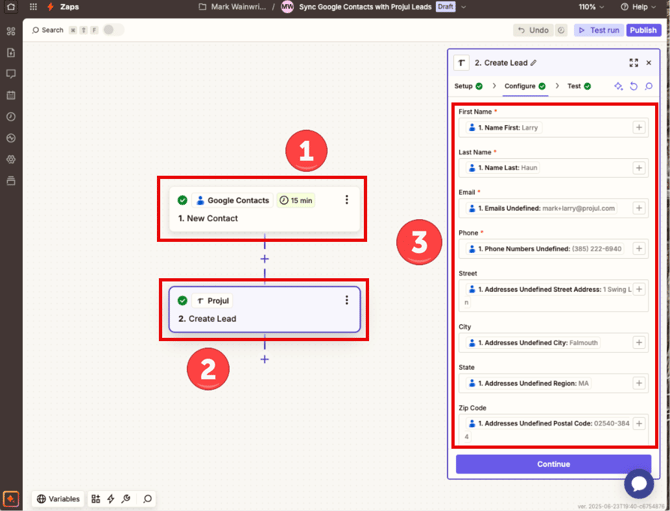
- Go to Zapier and create a new Zap
- Set your Trigger:
- Choose your form app (e.g., Typeform)
- Select the event (e.g., New Submission)
- Set your Action:
- Search for Projul. The first time, Zapier asks you to sign in with a Read-Write Projul AI Connect API key. See How do I connect Zapier, Make or n8n to Projul? for how to create one.
- Select Create Lead
Field Mapping Suggestions:
| Form Field | Projul Field |
| Name | First Name / Last Name |
| Phone | Phone |
| Project type or notes | Comments |
| Referral source | Lead source |
Or Use a Webhook
This is ideal if you're using a custom-built form or a form tool that supports webhooks.
Steps:
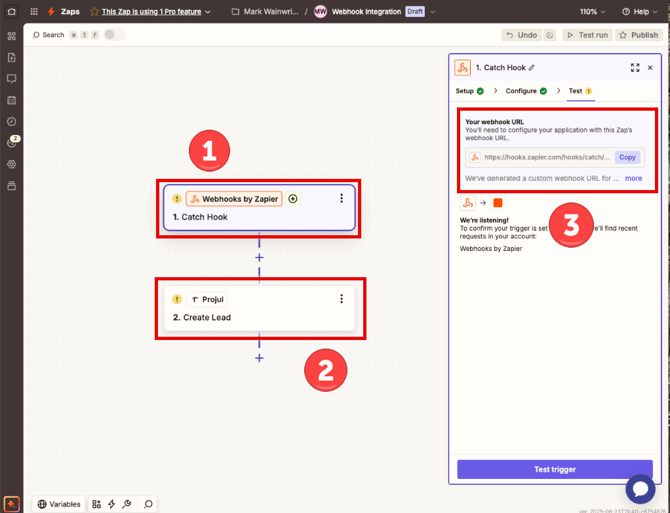
- Create a new Zap in Zapier
- Set your Trigger:
- Choose Webhooks by Zapier
- Select Catch Hook
- Copy the webhook URL Zapier gives you
- Configure your website form to POST submissions to this webhook URL
- Add an Action:
- Search for Projul
- Choose Create Lead
-
Map your form fields to Projul fields, as shown in the table above
Questions? Let's Chat.
support@projul.com
(844) 776-5853