![Projul Logo 345PX wide.png]](https://knowledge.projul.com/hs-fs/hubfs/Projul%20Logo%20345PX%20wide.png?height=40&name=Projul%20Logo%20345PX%20wide.png)
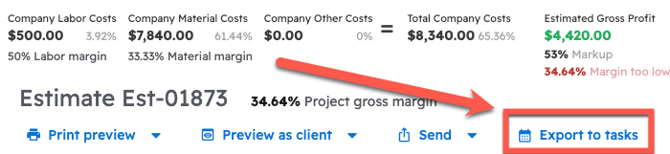
At the bottom of the estimate, click "Export to tasks". Then drag and drop the tasks onto the days on the schedule.
Labor items in the estimate can be exported directly to tasks on the schedule page. In order to do that, open the estimate, scroll to the bottom, and click the "Export to tasks" button.
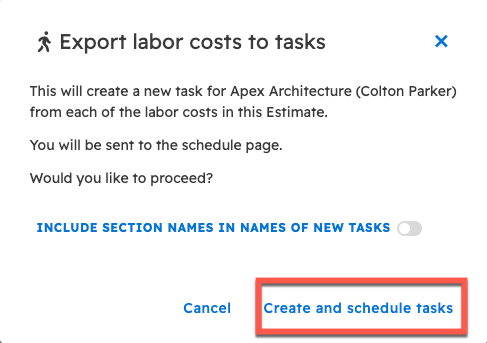
Next, confirm the creation of the tasks in the popup and choose whether or not to include the section names as part of the task names.
Once "Export to tasks" is selected and confirmed, the Schedule page will open automatically. The newly created tasks will display on the left hand side.
From this page, drag and drop the tasks from the list on the left onto the schedule.
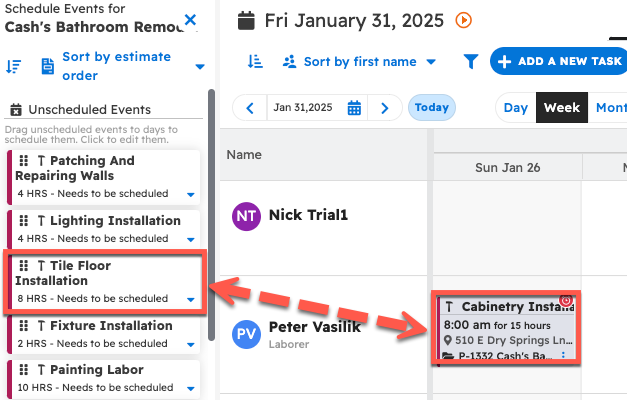
Once a task has been scheduled, tasks may be edited as normal to add any additional information desired. Also, you can use the "Day", "Week" or "Month" tab on the Schedule page, whichever you prefer.
Please note: If tasks were already created from all the labor items on an estimate, "Export to tasks" will not create new ones.
Questions? Let's Chat.
support@projul.com
(844) 776-5853