![Projul Logo 345PX wide.png]](https://knowledge.projul.com/hs-fs/hubfs/Projul%20Logo%20345PX%20wide.png?height=40&name=Projul%20Logo%20345PX%20wide.png)
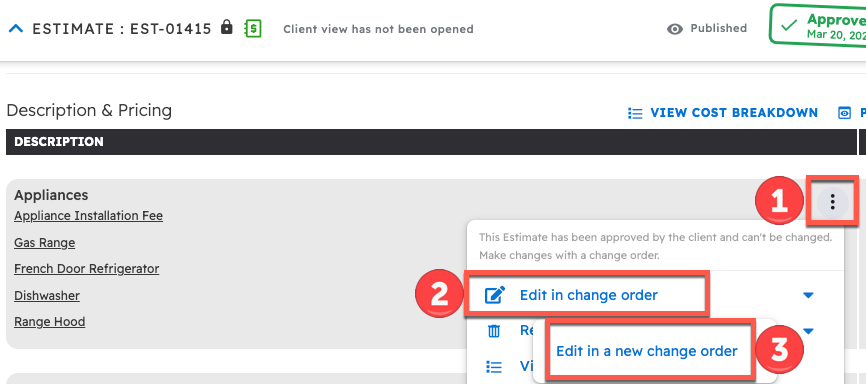
By selecting the three dot icon on the right side of a section in an approved estimate and pressing "Edit in Change Order," you can edit the section of the estimate in a change order.
To use a change order to edit an accepted estimate:
- Click on the three dot icon on the right side of a section
- Click on "Edit in change order"
- Pick an open change order from the list, or select "Edit in a new change order" if there is none. Change orders that are already approved or waiting for approval cannot be picked.
This leaves the approved section as it is and copies it into the change order, where it shows as "Removed from previous Estimate" with an editable copy below it. You can then edit the name, description, units, price, and any other information within the section.

Questions? Let's Chat.
support@projul.com
(844) 776-5853