![Projul Logo 345PX wide.png]](https://knowledge.projul.com/hs-fs/hubfs/Projul%20Logo%20345PX%20wide.png?height=40&name=Projul%20Logo%20345PX%20wide.png)
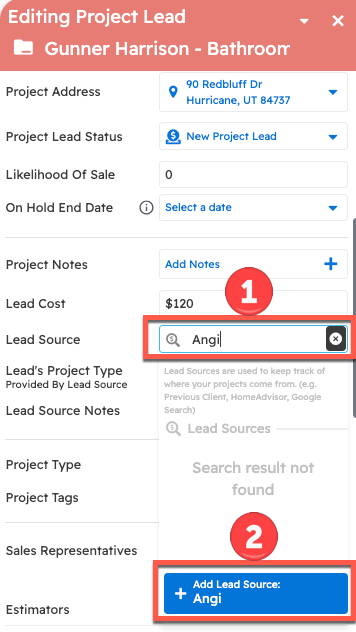
You can create lead sources and assign them to any number of leads. Just type in the lead source you would like when assigning lead sources and click the "Add Lead Source" button.
Start by finding your project lead either on the Lead Pipeline or the Projects page and pressing the edit button on the project or lead card.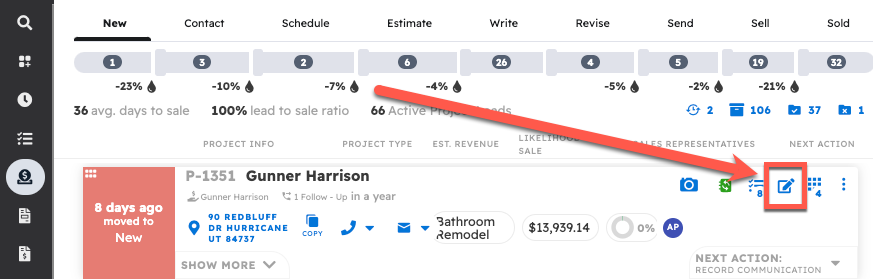
Scroll down to the "Lead Source" section of the editor, which is just below the Project Notes, and type in the name of the source of the lead. If this lead source already exists in your account, you can select it from the list. Otherwise, add it to your account by clicking the blue "Add Lead Source" button.
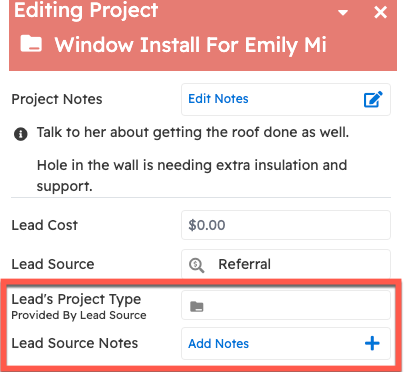
In addition to adding a Lead Source, you can also add a Lead's project type and notes. This can be useful to track as sometimes the lead will evolve into a much larger project than what the customer first had in mind when contacting your company.