![Projul Logo 345PX wide.png]](https://knowledge.projul.com/hs-fs/hubfs/Projul%20Logo%20345PX%20wide.png?height=40&name=Projul%20Logo%20345PX%20wide.png)
There are two places to change who pays the payment processing fee: the account default settings and individual invoices. The account default can be updated in Settings, and invoice-specific settings can be changed at the bottom of the invoice.
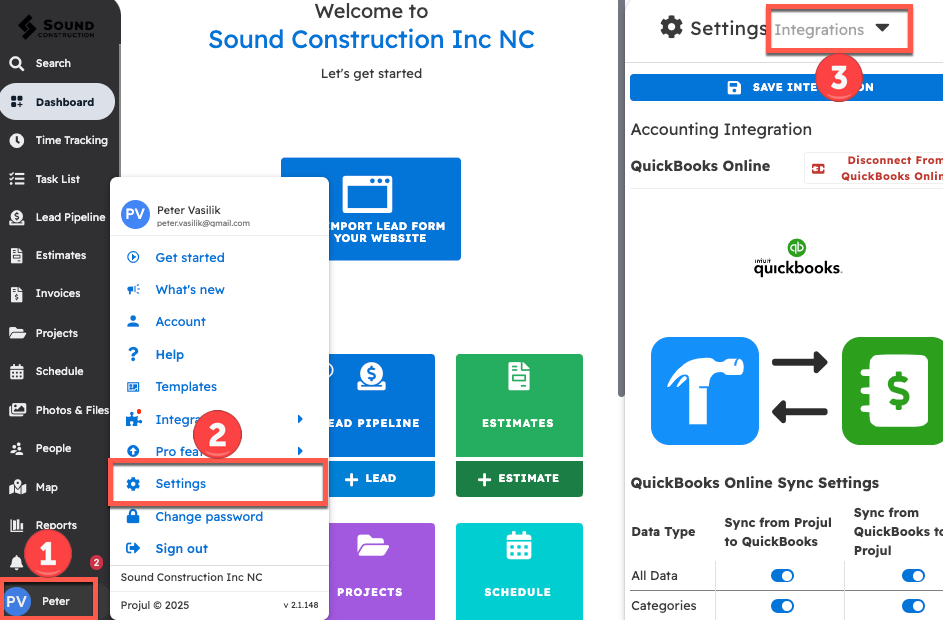
To change the account default for who pays payment processor fees:
- Click on the initials in the bottom left corner
- Open Settings
- Select "Integrations" from the dropdown menu
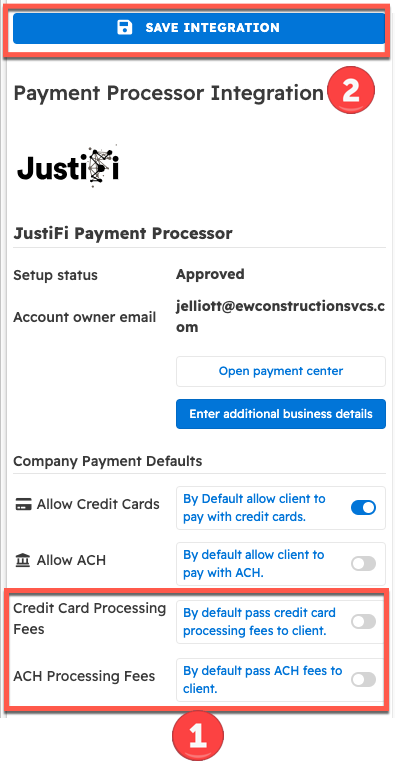
From the integration settings:
- Scroll down to "Company Payment Defaults." Under "Credit Card Processing Fees," turn on "By default pass credit card processing fees to client." Under "ACH Processing Fees," turn on "By default pass ACH fees to client." If a toggle is on, new invoices pass that fee to the client. If enabled, the account default will pass payment processing fees to clients.
- Click "Save Integration" before closing.
Note: Changing this account default will not affect any previously created Invoices. To change a previously created invoice, refer to "Change a Specific Invoice" below.
Change a Specific Invoice:
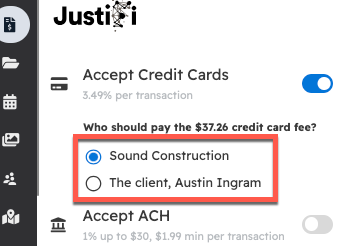
To change who pays the processing fee for a specific invoice, scroll down to the bottom of the invoice to see the toggles for who pays the processing fee.
Note: Changing this invoice payment option will only affect this invoice, and will have no impact on any other invoices.
Questions? Let's Chat.
support@projul.com
(844) 776-5853