![Projul Logo 345PX wide.png]](https://knowledge.projul.com/hs-fs/hubfs/Projul%20Logo%20345PX%20wide.png?height=40&name=Projul%20Logo%20345PX%20wide.png)
In ChatGPT, turn on "Developer mode", add Projul's address as a new app, then sign in by pasting your API key on the Projul page that opens.
This works on the Plus, Pro, Business, Enterprise and Edu plans, on the web. You also need your API key. See How do I get my Projul AI Connect API key?
Set it up
- In ChatGPT, open "Settings", then "Security and login", and turn on "Developer mode".
- Open "Plugins", click the plus button, and choose to create your own app.
- Name it Projul and enter https://connect.projul.com/mcp as the server address. For authentication choose "OAuth"; there is no client ID to fill in.
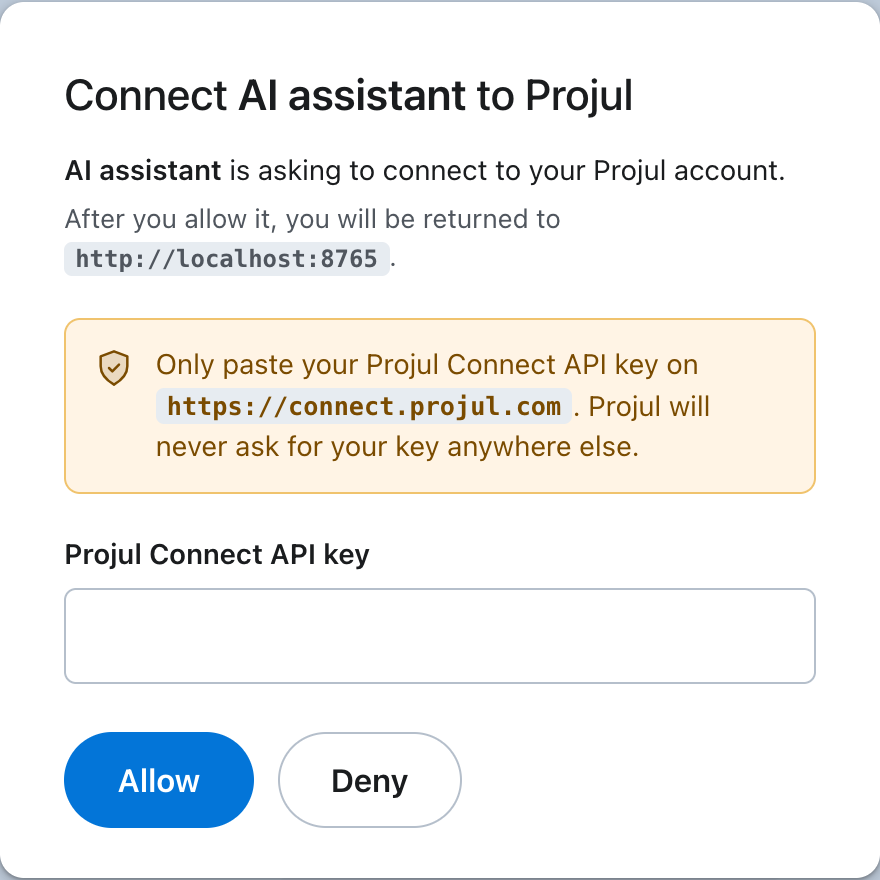
- Save it and click connect. A Projul page opens. Paste your key into the "Projul Connect API key" field and click "Allow".
What happens
ChatGPT shows Projul as connected. Start a new chat, turn Projul on from the plus button, then ask in plain English. ChatGPT asks you to confirm before it changes anything in Projul.
Note: To cut ChatGPT off, revoke the key under "Settings", "Projul AI Connect" in Projul. It loses access immediately.
Questions? Let's Chat.
support@projul.com
(844) 776-5853