![Projul Logo 345PX wide.png]](https://knowledge.projul.com/hs-fs/hubfs/Projul%20Logo%20345PX%20wide.png?height=40&name=Projul%20Logo%20345PX%20wide.png)
Tell your AI the job, the day and who's on it, and it creates the tasks in Projul and puts them on the Schedule.
Say this
Schedule [Harmon 4-Ton Heat Pump Changeout] in Projul for [Tuesday, July 14].

[7 to 9 am]: [Recover refrigerant and pull the old condenser and air handler] with [Marco Ruiz] and [Ty Chandler].
[9 to 11 am]: [Set the new condenser on the pad and set the air handler in the garage] with the same two.
[11 am to 2 pm]: [Run the new line set, condensate and float switch] with [Marco Ruiz] and [Ty Chandler].
[2 to 3 pm]: [Electrical, whip and disconnect] with [Ty Chandler].
[3 to 5 pm]: [Pressure test, evacuate, weigh in the charge and start up] with [Marco Ruiz].
What happens
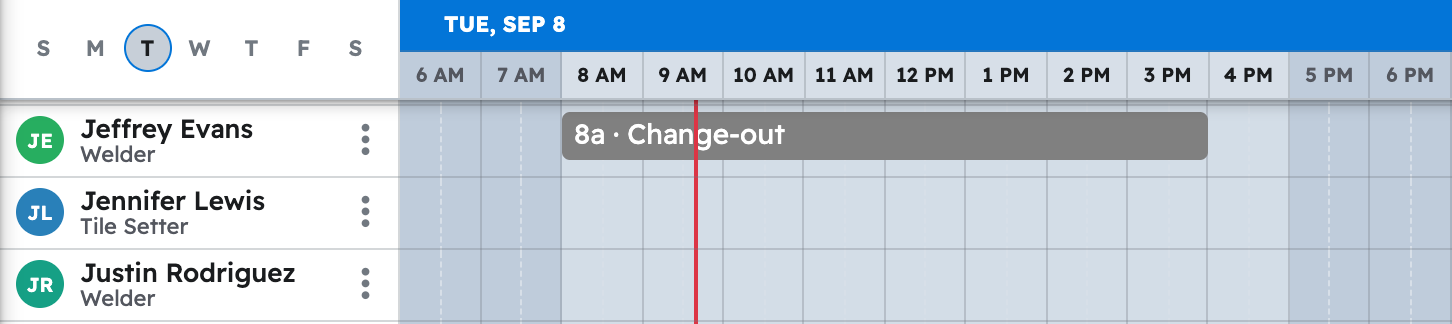
Your AI asks you to approve, then confirms the tasks. Click "Schedule" in Projul to see them on each person's row.
Note: Marking a task complete records the work is done, not hours; time tracking isn't available to your AI yet. See what's not available yet
Questions? Let's Chat.
support@projul.com
(844) 776-5853