![Projul Logo 345PX wide.png]](https://knowledge.projul.com/hs-fs/hubfs/Projul%20Logo%20345PX%20wide.png?height=40&name=Projul%20Logo%20345PX%20wide.png)
There is a Change History specific to every task, sub-task, lead, project, employee, contractor, and customer.
Navigate to the entity that you would like to view the change history for in Projul. In this example we will be accessing the Change History of a Project.
To view the Change History:
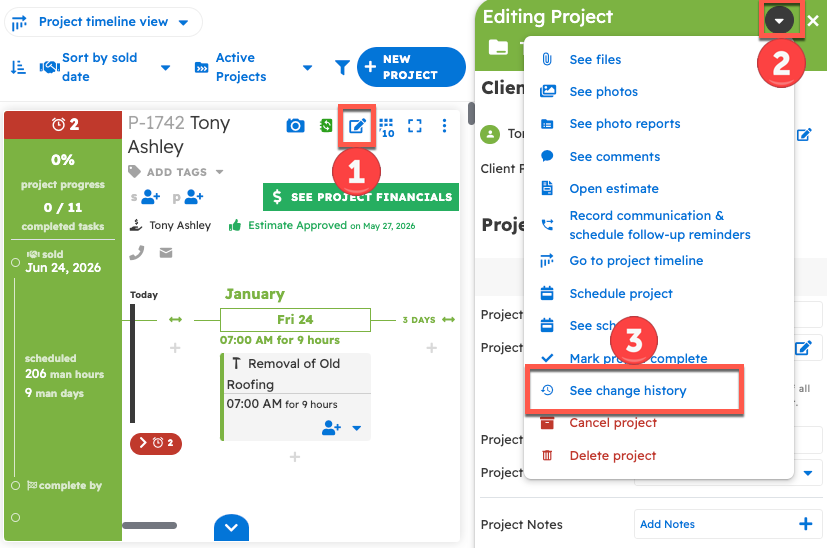
- Select the "edit" icon in the top right corner of the entity.
- Open the dropdown menu in the top right corner of the Sidebar Editing tool (beside the exit icon).
- Navigate to the "See Change History" option.
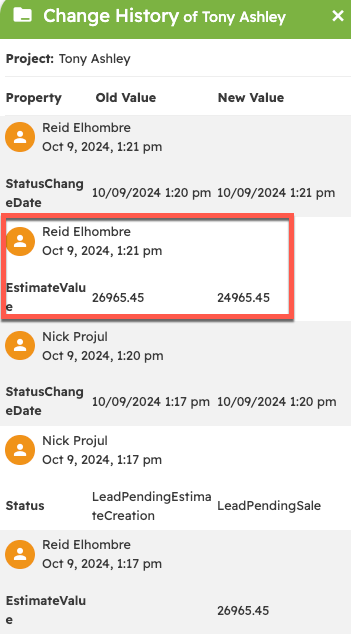
This opens up the Change History of the entity (in this case, the Project). In the change history, you can see a log of all the changes made to this entity, including the change, the time the change was made, and the user that made the change.
Questions? Let's Chat.
support@projul.com
(844) 776-5853