![Projul Logo 345PX wide.png]](https://knowledge.projul.com/hs-fs/hubfs/Projul%20Logo%20345PX%20wide.png?height=40&name=Projul%20Logo%20345PX%20wide.png)
Projul AI Connect lets an AI assistant work inside your Projul account for pool and outdoor-living work. You turn it on in "Settings" by creating an API key under "Projul AI Connect", then paste that key into the AI tool you already use.
Contents
Leads and clients
Your AI can add a lead with the client, address, likelihood of sale and assigned estimator, move it through your pipeline, mark it sold or rejected, and list leads with no recent follow-up.
Add a lead for [client name] at [job-site address], assigned to [estimator name], in the [stage] stage.
See How do I have my AI add a new lead?.
Estimates and change orders
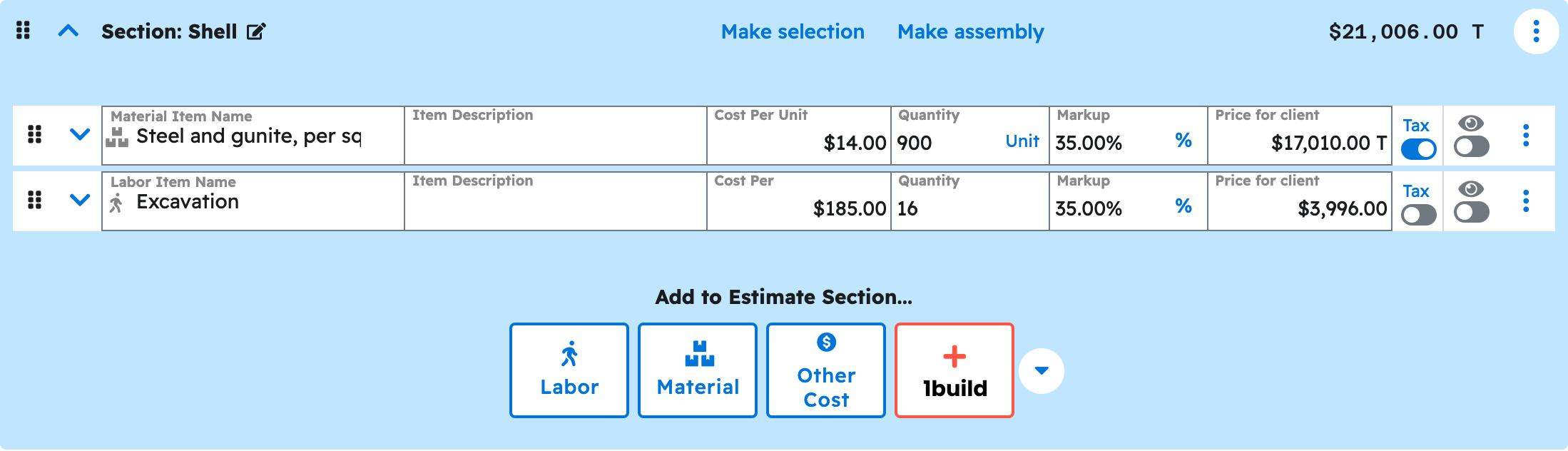
Your AI can build a pool estimate in the units a build uses: cubic yards of spoil, square feet of shell and decking, linear feet of tile and coping. It works from a template or from scratch, sets up heater, salt system or lighting as a selections section, applies tax and a discount, and adds a change order for scope such as rock in the dig.
Create a draft estimate for [project name] from my [template name] template, with the shell at [square feet] and decking at [square feet].
See How do I have my AI build a pool estimate? and How do I have my AI add a change order?.
Scheduling and crews
Your AI can create tasks for each build phase, such as excavation, steel, gunite and decking, each with its own dates. It assigns a person, subcontractor or team, adds a checklist, shifts a task and the ones after it, and sets up a repeating task such as a weekly water check.
Schedule [project name] starting [date]: excavation 1 day, steel 2 days, gunite 1 day, then a 3-week cure before tile. Assign my dig crew to excavation.
See How do I have my AI schedule pool crews and jobs?.
Photos, files and messages
Your AI can attach photos and documents already in Projul to a project, task or estimate. Uploading a new file needs an AI tool that can transfer files itself; a web, desktop or phone chat assistant cannot. Your AI can also log a call, text or site visit on a job.
Log a call with [client name] today about [what was discussed], attached to [project name].
See How do I have my AI upload a job-site photo or document?.
Templates
Your AI can save a finished estimate as a template, build section templates for parts you reuse such as an equipment pad, and add priced items to your cost-item library. The same templates fit shorter off-season jobs such as replaster or equipment change-out.
Save this estimate as a template called [template name].
See How do I have my AI create an estimate from one of my templates?.
What your AI cannot do yet
These parts of the job stay in Projul as they are today.
- Publishing or sending an estimate or change order (your AI leaves it as a Draft).
- Invoices and payments.
- Time tracking.
- Purchase orders.
- Daily logs.
- QuickBooks sync.
Note: The current list is kept in Which Projul features are not available to my AI yet?.
Where to start
- Create your API key.
- the "Connect your AI" section.
- Check the connection.
- Build a pool estimate.
- Work your leads.
- Schedule the build.
- Keep the prompts handy.
Questions? Let's Chat.
support@projul.com
(844) 776-5853